Explainer · AI PCs · November 2026
Why is there an AI chip in almost every new computer?
It isn’t only about making laptops faster. A third kind of processor, the NPU, now sits beside the CPU and GPU. Here is what it does, why it saves battery, and why Intel, AMD, Qualcomm and Apple all build one in.
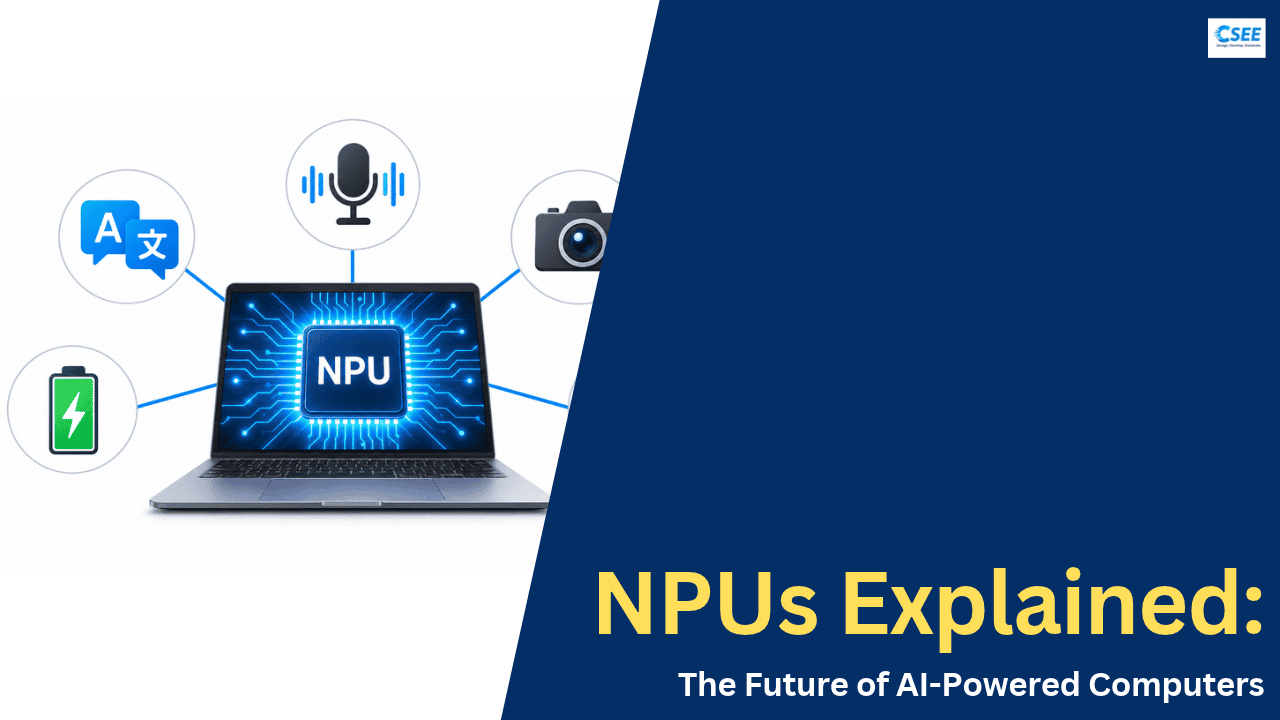
Walk into any electronics store this year and look at the stickers on the laptops. You will see “AI PC”, “Copilot+ PC”, “Ryzen AI”, “Core Ultra”, “Snapdragon X2”. Underneath the marketing there is one real hardware change that ties all of them together. Almost every new processor now ships with a dedicated block of silicon built for artificial intelligence. It is called an NPU, short for Neural Processing Unit.
A common assumption is that this chip exists to make your computer faster in general. That is not really the point. The NPU is about doing one particular kind of work, the math behind AI models, using far less electricity than the other chips would need. That single idea explains why it is showing up everywhere, from thin office laptops to desktop processors.
Three engines, three jobs
For decades a computer had two main brains. The CPU (central processing unit) runs the operating system, opens your apps, and handles general-purpose logic. The GPU (graphics processing unit) draws everything on screen and, because it has hundreds or thousands of small cores, became the go-to chip for any job that splits into many identical pieces, such as games, video editing, and training AI models in data centres.
The NPU is the newcomer. It is narrower than both. It is not good at running a spreadsheet and it does not draw your game. It does one thing: the huge amounts of repeated multiplication and addition that neural networks need to produce an answer. Because it does only that, it can be designed to do it very efficiently.
CPU
A few powerful cores. Excellent at varied, step-by-step logic, branching decisions, and keeping the whole system running.
GPU
Many simpler cores working in parallel. Built for graphics, fast at big AI jobs, but draws a lot of power when busy.
NPU
Arrays of tiny math units tuned for neural networks. Runs steady AI tasks for long periods while sipping power.
What does an NPU actually do?
Every AI model, whether it removes background noise from your microphone or turns your speech into captions, works the same way underneath. It takes an input (a slice of audio, a camera frame, a sentence) and pushes it through layers of numbers called weights. At each layer the chip multiplies inputs by weights and adds the results together. This is called a multiply-accumulate operation, or MAC. A single AI feature might need billions of them every second.
A CPU can do this math, but it handles it a few operations at a time, with a lot of extra machinery for scheduling, prediction, and general-purpose flexibility that this work does not need. A GPU can do it massively in parallel, but it is a large, power-hungry block designed with graphics in mind. An NPU strips everything down to the essentials: a big grid of MAC units, wired so data flows through them in a steady stream, with fast local memory right next to them so the weights don’t have to keep travelling back and forth to main RAM.
NPUs also use smaller, simpler numbers. Instead of the high-precision 32-bit values a CPU uses by default, they typically run AI models with 8-bit or even 4-bit integers. Shrinking the numbers this way, called quantization, barely changes the result for tasks like noise removal or image recognition, but it lets the chip fit more math units into the same space and use less energy per operation.
NPU speed is quoted in TOPS, trillions of operations per second. A 50 TOPS NPU can, in theory, perform 50 trillion simple math operations every second. It is a peak figure, measured at low precision, so it is useful for rough comparison rather than as a promise of real-world speed.
The real reason: battery life
If the GPU can already run AI, why add another chip? Because of what modern AI features look like in daily use. Many of them are always on. Background blur and eye-contact correction run for the entire length of a video call. Noise suppression listens to your microphone the whole time. Live captions transcribe continuously. These are not short bursts. They are small, steady workloads that run for an hour or more.
Running those on a GPU is like using a truck to deliver a single letter every few seconds. It works, but the engine is idling at high revs the whole time. On a laptop, that means heat, fan noise, and a battery that drains noticeably faster. The NPU is the bicycle courier: it carries exactly the right load at very low cost, and it can keep going all day.
This is why chipmakers talk so much about efficiency, sometimes measured as “TOPS per watt”. Microsoft has said that its 40 TOPS bar for Copilot+ PCs was chosen so features like Windows Studio Effects, Live Captions with translation, and Recall could feel instant without draining the battery. Intel’s own pitch for its 2026 chips pairs the NPU with “all-day” battery claims, with some optimised designs advertised at 27 to 40 hours of video playback.
Local AI versus the cloud
The second big reason is where the AI runs. Until recently, most AI features on a laptop worked by sending your data to a server in a data centre, waiting for the answer, and downloading it back. That works, but it has costs that both you and the software company feel.
Running AI locally helps in four ways. It is faster, because there is no network round trip, which matters a lot for real-time jobs like captions or camera effects where even a fraction of a second of lag is noticeable. It is more private, because your voice, face and documents don’t have to leave the machine. It works offline, on a plane or a weak connection. And it is cheaper for software companies, who pay for every second of server time their cloud AI uses. Pushing millions of small AI requests onto the user’s own hardware saves them a great deal of money, which is a quiet but important reason the industry is so keen on NPUs.
This does not mean the cloud is going away. Large language models of the ChatGPT or Claude class need far more memory and compute than any laptop NPU offers. The likely future is hybrid: big, complex requests go to the cloud, while the many small, frequent and private tasks happen on your device.
What NPUs do for you today
Here are the most common features that run on, or can run on, a laptop’s NPU in 2026. Availability varies by operating system, chip and app, but this gives a realistic picture of what the hardware is used for.
| Feature | What it does | Why the NPU fits |
|---|---|---|
| Noise removal | Filters out keyboard clicks, fans, traffic and voices behind you on calls | Runs for the whole call; needs low, steady power |
| Camera effects | Background blur, auto-framing, eye-contact correction, lighting fixes | Processes every video frame continuously |
| Live captions & translation | Turns speech from any app into on-screen text, and can translate it in real time | Needs instant response and keeps audio private |
| Smart search & recall | Finds files, photos or past screens by describing them in plain language | Indexes in the background without slowing the PC |
| Writing & summary tools | Rewrites, proofreads and summarises text with small on-device models | Short bursts, private documents, works offline |
| Photo & image edits | Object removal, upscaling, simple image generation in apps like Paint | Shares work with the GPU depending on size |
| Security & presence | Locks the screen when you walk away, flags someone looking over your shoulder | Always watching, so it must cost almost nothing |
Why every chipmaker joined in
NPUs didn’t start in PCs. Apple put a “Neural Engine” in its iPhone chips years earlier, and phones have used AI accelerators for camera processing for a long time. Apple brought the Neural Engine to the Mac with the M1 in 2020. Windows PCs followed later, and the turning point came in 2024 when Microsoft defined a new class of machine, the Copilot+ PC.
To carry that label, a PC must have an NPU that delivers at least 40 TOPS, plus at least 16 GB of RAM and 256 GB of storage. Microsoft treats this as a hard gate. A laptop that misses the NPU requirement doesn’t get the on-device Copilot+ features, even if it has a strong graphics card. That one rule gave every chipmaker a clear number to beat, and it kicked off what reviewers started calling the “TOPS wars”.
The jump was dramatic. Intel’s Meteor Lake chips from late 2023 offered around 10 TOPS on the NPU, and AMD’s Hawk Point offered 16. Neither qualified. Within a year, every major vendor had chips well above 40.
- 2020Apple M1 brings the Neural Engine to the MacAround 11 TOPS. AI hardware in a mainstream laptop chip becomes normal on macOS.
- 2023Intel Meteor Lake and AMD Hawk PointFirst widespread Windows laptop NPUs, at roughly 10 and 16 TOPS.
- 2024Copilot+ PC standard: 40 TOPS minimumSnapdragon X Elite (45), Intel Lunar Lake (48) and AMD Ryzen AI 300 (50) clear the bar. Apple’s M4 Neural Engine reaches 38 TOPS.
- 2025Apple M5 spreads AI across the chipApple adds a Neural Accelerator inside every GPU core alongside its 16-core Neural Engine, claiming over 4× the peak GPU AI compute of M4.
- 2026The second generation landsSnapdragon X2 Elite and X2 Plus at 80 TOPS, AMD Ryzen AI 400 at up to 60, Intel Panther Lake at 50. AMD also announces the first Copilot+ desktop processor.
How the four big players approach it
Intel builds its NPU into the Core Ultra line. The 2026 Core Ultra Series 3 chips, code-named Panther Lake, are made on Intel’s new 18A process and carry a 50 TOPS NPU. Intel also likes to quote “platform TOPS”, adding CPU and GPU together to reach about 180, which is a reminder that the NPU is only one of three engines that can run AI.
AMD calls its NPU architecture XDNA and brands its chips “Ryzen AI”. The Ryzen AI 400 series (Gorgon Point) raised the top NPU rating from 50 to 60 TOPS, and AMD is bringing the same silicon to desktop sockets, making NPUs a feature of tower PCs and not only laptops.
Qualcomm comes from the smartphone world, where its Hexagon NPU has been doing on-device AI for years. Its Arm-based Snapdragon X2 Elite, X2 Elite Extreme and X2 Plus all carry an 80 TOPS NPU, currently the highest rating in a mainstream laptop chip, nearly double the 45 TOPS of the first Snapdragon X Elite.
Apple takes a slightly different route. The M-series chips have a 16-core Neural Engine, but with the M5 Apple added a dedicated Neural Accelerator inside every GPU core, so heavy AI jobs such as running language models can use the GPU while lighter work stays on the Neural Engine. Apple designs the hardware and macOS together, so features like Apple Intelligence pick the right engine automatically.
| Chip family | Company | NPU name | Peak NPU | Notes |
|---|---|---|---|---|
| Snapdragon X2 Elite / X2 Plus | Qualcomm | Hexagon | 80 TOPS | Arm-based Windows laptops; highest NPU rating in 2026 |
| Ryzen AI 400 (Gorgon Point) | AMD | XDNA 2 | up to 60 TOPS | Lower models at 50 TOPS; also coming to AM5 desktops |
| Core Ultra Series 3 (Panther Lake) | Intel | NPU 5 | 50 TOPS | Built on Intel 18A; ~180 combined “platform TOPS” |
| Apple M5 family | Apple | Neural Engine + GPU Neural Accelerators | not published | AI split between Neural Engine and every GPU core |
Figures are manufacturer peak ratings for the top model in each family. Lower-tier models may have smaller NPUs.
CPU, GPU and NPU side by side
None of these three chips is “best”. Each wins in a different situation, which is why modern processors include all of them and let the software choose.
| Trait | CPU | GPU | NPU |
|---|---|---|---|
| Designed for | General tasks, logic, the OS | Graphics, large parallel math | Neural network inference |
| Core style | Few, large, flexible cores | Hundreds to thousands of small cores | Fixed grids of multiply-add units |
| AI speed | Slowest | Fastest for big, bursty jobs | Fast for small and medium models |
| Power use for AI | High | High | Lowest |
| Best AI use | Tiny models, quick fallbacks | Image generation, local chatbots | Always-on effects, captions, background tasks |
| Flexibility | Runs anything | Very broad | Narrow; needs supported software |
The catch: TOPS isn’t everything
It is easy to treat TOPS like megapixels on a camera, where bigger always sounds better. In practice, the number tells you less than you might think. TOPS is a theoretical peak at low precision. Real performance depends on memory bandwidth, drivers, the quality of the software toolkit, and whether the app you use was even written to target the NPU.
Some independent testing has found that, for certain heavy tasks like generating an image, a chip’s own integrated GPU finished faster than its NPU. That is not a failure of the NPU. It just shows the NPU is tuned for efficiency on steady workloads, not raw speed on every job. The GPU can be quicker; the NPU can do the same work for hours on a fraction of the power.
Software is the other limit. A few years ago, very few apps used the NPU at all, which led critics to call it a solution waiting for a problem. That has improved. Windows now offers system-level AI features and developer tools that target the NPU, Apple exposes its engines through Core ML and Metal, and video-call apps, creative tools and browsers increasingly offload work to it. Still, when you compare laptops, check which features you will actually use rather than chasing the biggest number.
If you want Windows’ on-device AI features, look for the Copilot+ label, which guarantees an NPU of at least 40 TOPS, and pair it with at least 16 GB of RAM. Memory matters for local AI as much as the NPU does. Be aware that some processors with very similar names ship without an NPU, so check the spec sheet for a separate NPU rating.
Where this is heading
The direction is clear. NPU ratings roughly doubled in two years, and they are now included across price ranges, from premium ultrabooks down to mid-range models such as the Snapdragon X2 Plus and entry Ryzen AI chips. As more features run locally, your computer stops being only a tool that opens programs. It becomes something that understands what is on your screen, what you said in the last meeting, and what you are trying to do next, and can help in the background.
Expect three trends over the next few years. First, small on-device language models will handle more everyday writing, search and assistant tasks without an internet connection. Second, AI agents that can carry out multi-step tasks on your PC will lean on the NPU so they can run quietly without draining the battery. Third, the line between NPU and GPU will blur, as Apple’s M5 already shows, with AI hardware spread across the whole chip and the operating system choosing the best place for each job.
So the next time you see an “AI PC” sticker, you will know what it really means. It is not a promise that the laptop is magically smarter. It means there is a small, efficient specialist inside, built to run the AI features of the next few years locally, privately and without killing your battery. That is why it is in almost every new computer.
Key takeaways
- An NPU is a processor built only for AI math, sitting beside the CPU and GPU on the same chip.
- Its main advantage is efficiency: it runs always-on AI features using far less power, which protects battery life.
- Running AI locally is faster, more private, works offline and saves cloud costs for software makers.
- Microsoft’s 40 TOPS Copilot+ requirement pushed Intel, AMD and Qualcomm to put powerful NPUs in all their new chips; Apple has had its Neural Engine since the M1.
- TOPS is a rough guide, not the whole story. Memory, software support and the features you use matter just as much.
- Evetech: What is the Copilot+ 40 TOPS threshold
- Neowin: Microsoft Copilot+ PC requirements
- Tom’s Hardware: Meteor Lake and Hawk Point NPU figures
- MySmartPrice: CES 2026 AI PC announcements
- The Gadgeteer: Intel vs AMD vs Snapdragon in 2026
- TechSpot: AMD Ryzen AI 400 Gorgon Point
- EatYourBytes: Snapdragon X2 Plus 80 TOPS
- All About Circuits: Apple M5 neural accelerators
- Solid AI Tech: NPU benchmarks and TOPS caveats