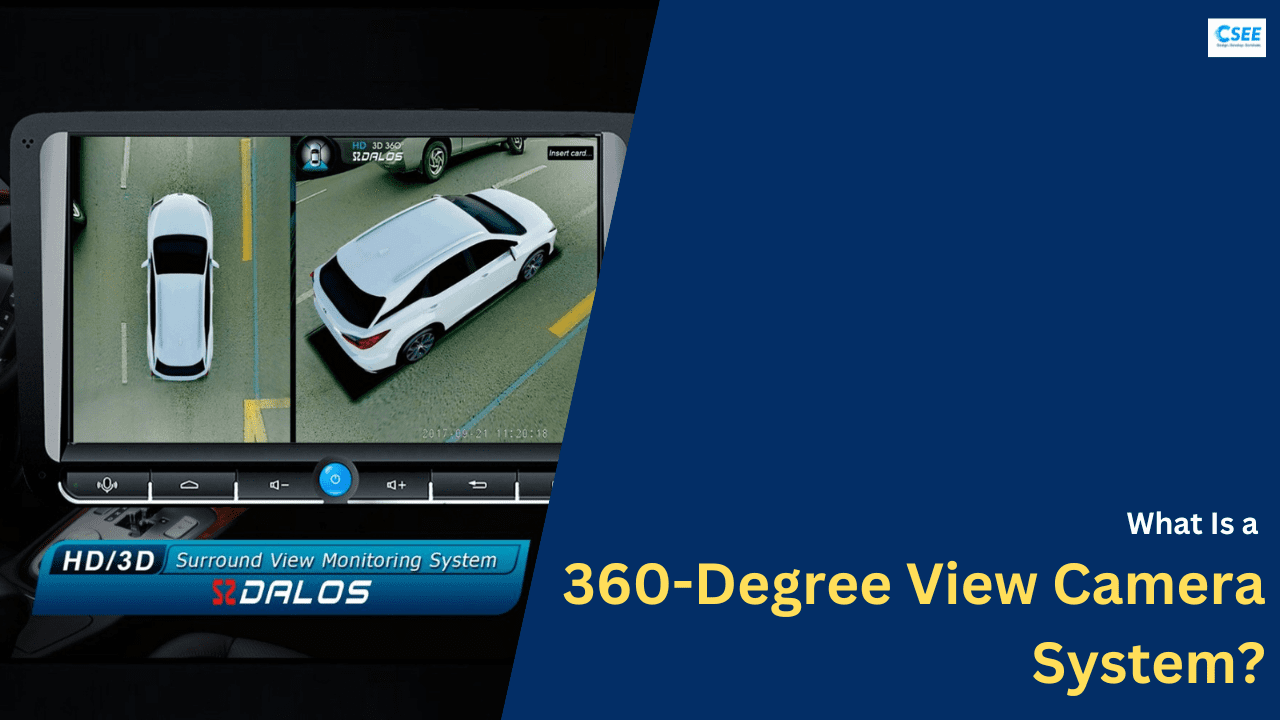
Cars today are no longer just engines, wheels, and brakes. They are smart machines filled with electronics, sensors, cameras, and software. One of the most impressive features that has become common even in mid-range cars is the 360-degree view camera system.
When you sit inside a car and look at the infotainment screen, it sometimes feels like the car is being watched from above, showing all sides clearly. Many people ask a simple but interesting question:
“How does the car show a top view when there is no camera above the car?”
The answer lies in multiple cameras, image processing, and real-time software algorithms.
This article explains how a 360-degree view system works from start to end, including:
- Full working flow
- Components used
- Camera placement
- Image stitching logic
- Calibration
- Sensors involved
- Automotive terms explained simply
Whether you are a student, working professional, or automotive enthusiast, this article will give you a complete understanding.
What Is a 360-Degree View Camera System?
A 360-degree view camera system (also called Surround View System or Bird’s-Eye View System) is an ADAS (Advanced Driver Assistance System) feature that shows a complete view around the car on the screen.
It combines video from multiple cameras placed around the vehicle and converts them into a single top view image.
This system is mainly used during:
- Parking
- Reversing
- Low-speed driving
- Driving in narrow or crowded areas
The goal is simple:
👉 Help the driver see areas that are normally not visible from the driver’s seat.
Why 360-Degree View Is Important in Modern Cars
Driving conditions today are becoming more challenging because of:
- Narrow parking spaces
- Heavy traffic
- Tight city roads
- Limited visibility
Even experienced drivers sometimes struggle while parking or turning in tight areas.
Problems Without 360-Degree View
- Blind spots near wheels and bumpers
- Risk of hitting nearby objects
- Difficulty judging distance
- Stress during parking
Benefits of 360-Degree View System
- Full visibility around the car
- Reduced chance of scratches and damage
- Easier parking for beginners
- Better safety for pedestrians and cyclists
This is why car manufacturers are adding this feature even in non-luxury cars.
Main Components of a 360-Degree View Camera System
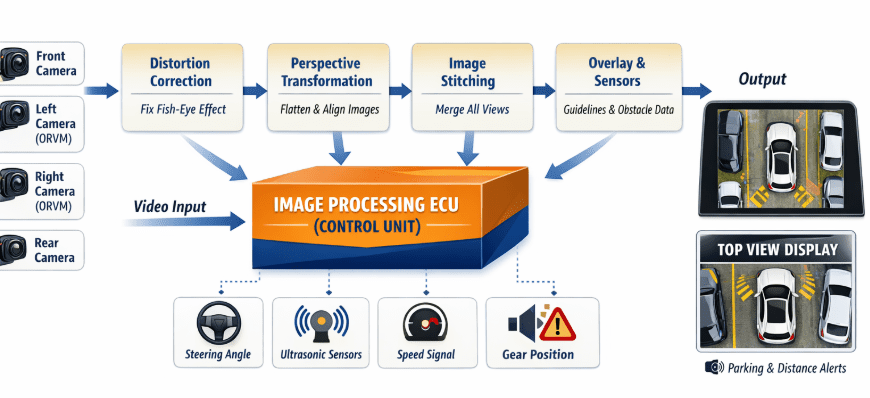
A 360-degree system is a combination of hardware and software. Each part has a specific role.
Major Components:
- Cameras
- Image Processing ECU
- Vehicle Sensors
- Display Unit
- Wiring and Communication Interfaces
Let’s understand each one in detail.
Cameras Used in 360-Degree View System
Number of Cameras
Most systems use 4 cameras, while advanced systems may use 5 or 6 cameras.
Standard 4-Camera Setup
- Front Camera
- Rear Camera
- Left Side Camera
- Right Side Camera
The side cameras are mounted under ORVMs (Outside Rear View Mirrors).
Camera Placement and Purpose
1. Front Camera
- Mounted on front grille or logo
- Covers front bumper and road ahead
2. Rear Camera
- Mounted near number plate
- Covers rear bumper and parking area
3. Left ORVM Camera
- Mounted under left Outside Rear View Mirror
- Covers left side doors and wheel area
4. Right ORVM Camera
- Mounted under right Outside Rear View Mirror
- Covers right side doors and wheel area
Each camera covers a wide area and slightly overlaps with other cameras.
Camera Specifications (Simple Explanation)
- Wide-angle lens: Covers large area (up to 180°)
- Resolution: Usually 1–2 Megapixels
- Frame rate: Around 25–30 frames per second
- HDR support: Helps in bright sunlight and night
- Automotive grade: Works in heat, rain, dust
Why Wide-Angle (Fish-Eye) Cameras Are Used
Normal cameras cannot cover a large area. So 360-degree systems use fish-eye lenses.
Advantage
- Covers more area with fewer cameras
Disadvantage
- Creates image distortion
- Straight lines appear curved
This distortion is corrected later using software.
Image Processing ECU (Electronic Control Unit)
The Image Processing ECU is the brain of the entire system.
What the ECU Does
- Receives video from all cameras
- Corrects image distortion
- Aligns camera views
- Combines images
- Creates top view output
- Sends final image to display
Hardware Inside the ECU
- Automotive processor (SoC)
- Image Signal Processor (ISP)
- Graphics Processing Unit (GPU)
- Memory (RAM + Flash)
Software Inside the ECU
- Real-Time Operating System (RTOS)
- Image processing algorithms
- Calibration data
- Safety logic
Vehicle Sensors Used in 360-Degree View System
The system does not work alone. It takes help from other vehicle signals.
Important Sensors and Inputs
1. Steering Angle Sensor
- Tells which direction wheels are turning
- Used to move parking guidelines on screen
2. Ultrasonic Sensors
- Detect nearby objects
- Used for distance warning
3. Gear Position Signal
- Activates rear view when reverse gear is selected
4. Vehicle Speed Signal
- System works only at low speed
- Automatically turns off at high speed
Display Unit (Infotainment Screen)
The final image is shown on:
- Infotainment screen
- Digital instrument cluster (in some cars)
Common Display Modes
- Full 360-degree top view
- Front view
- Rear view
- Side view
- Split screen view
Driver can switch views manually or automatically based on driving condition.
Understanding the “Top View” Illusion
There is no camera above the car.
The top view is created by:
- Removing distorted edges
- Flattening camera images
- Placing a virtual car model in center
- Stitching all sides together
This makes it look like a camera is floating above the vehicle.
Step-by-Step Working Flow of 360-Degree View System
Now let’s understand the complete working flow, step by step.
Step 1: Image Capture
- Each camera continuously captures live video
- Images are wide-angle and distorted
Step 2: Video Signal Transfer
Camera data is sent to ECU using high-speed interfaces such as:
- LVDS
- FPD-Link
- GMSL
These interfaces are designed for automotive use.
Step 3: Lens Distortion Correction
Because of fish-eye lenses:
- Lines appear curved
- Shapes look stretched
The ECU applies distortion correction algorithms using stored calibration data.
Step 4: Perspective Transformation
Images from side and front cameras are:
- Tilted
- Rotated
- Flattened
So that all images look like they are taken from the same angle.
Step 5: Image Stitching
This is the most important step.
- Overlapping areas from cameras are matched
- Brightness and color are balanced
- Borders are blended smoothly
Result: One seamless image
Step 6: Virtual Car Overlay
A 3D or 2D car model is placed in the center of the stitched image.
This:
- Hides blind spots under the car
- Gives reference to driver
Step 7: Guidelines and Sensor Overlay
- Parking lines move based on steering angle
- Warning colors appear when obstacles are near
Step 8: Display Output
Final image is sent to screen with very low delay (real time).
Calibration: The Backbone of Accuracy
Without calibration, the system will not work correctly.
What Is Calibration?
Calibration means teaching the system:
- Exact camera position
- Height from ground
- Angle and orientation
Types of Calibration
1. Factory Calibration
- Done during vehicle manufacturing
- Uses calibration mats and patterns
2. Service Calibration
- Required after camera replacement
- Done at service center
Common Automotive Terms Explained Simply
- ADAS: Safety features that assist driver
- ECU: Small computer inside vehicle
- ORVM: Outside Rear View Mirror
- ISP: Image processing unit
- SoC: Processor with multiple functions
- HDR: Better image in light and dark areas
Challenges in 360-Degree View Systems
- Lighting differences
- Rain and dirt on cameras
- Night visibility
- Processing delay
Automotive software is constantly improving to solve these issues.
Future of 360-Degree Camera Systems
- Higher resolution cameras
- AI-based object detection
- Integration with autonomous driving
- Better night vision
Conclusion
The 360-degree view camera system is a perfect example of how electronics, software, and mechanical systems work together in modern cars. What looks simple on the screen is actually the result of complex real-time processing, precise calibration, and intelligent design.
This technology not only improves driving comfort, but also plays a major role in vehicle safety.
Thanks for reading.
Also, read:
- “Mother of All Deals”: How The EU–India Free Trade Agreement Can Reshape India’s Economic Future
- 10 Free ADAS Projects With Source Code And Documentation – Learn & Build Today
- 10 Tips To Maintain Battery For Long Life, Battery Maintainance
- 10 Tips To Save Electricity Bills, Save Money By Saving Electricity
- 100 (AI) Artificial Intelligence Applications In The Automotive Industry
- 100 + Electrical Engineering Projects For Students, Engineers
- 100+ C Programming Projects With Source Code, Coding Projects Ideas
- 100+ Indian Startups & What They Are Building