Career guide · Embedded Systems × Generative AI
100 LLM-Based Project Ideas for Embedded Engineers
If you want to crack top embedded and automotive companies, start building LLM-based embedded projects. LLMs are no longer limited to chatbots. They can be combined with Embedded C, firmware, RTOS, CAN, AUTOSAR, MATLAB, debugging, BMS, Edge AI and real hardware.
1. Why this matters now
Embedded roles used to be judged on three things: can you write correct C, can you read a datasheet, and can you debug on hardware. Those skills still matter. What has changed is that engineering teams now use language models to speed up the repetitive parts of the job: reading logs, drafting drivers, writing test cases, summarising requirements and explaining crash dumps.
An engineer who understands both sides is rare. You know why a CAN frame is lost under load, and you also know how to give a model the right context so it can help find the cause. That combination is exactly what hiring managers at automotive suppliers, semiconductor companies and Tier-1 firms are starting to look for.
Projects are the fastest way to prove it. A GitHub repository that parses a real CAN log, asks a model for hypotheses, and checks them against a DBC file says more than a certificate. This guide gives you 100 starting points.
Three shifts driving demand
Software-defined vehicles
Cars now run millions of lines of code across dozens of ECUs. Tooling that understands code, logs and specs saves large amounts of engineering time.
Edge AI hardware
NPUs and GPUs now sit inside microcontrollers and automotive SoCs. Someone must optimise, quantise and deploy models on them.
Documentation pressure
ASPICE, ISO 26262 and MISRA demand traceability. Models can draft and cross-check documents, with an engineer approving the result.
2. The common architecture
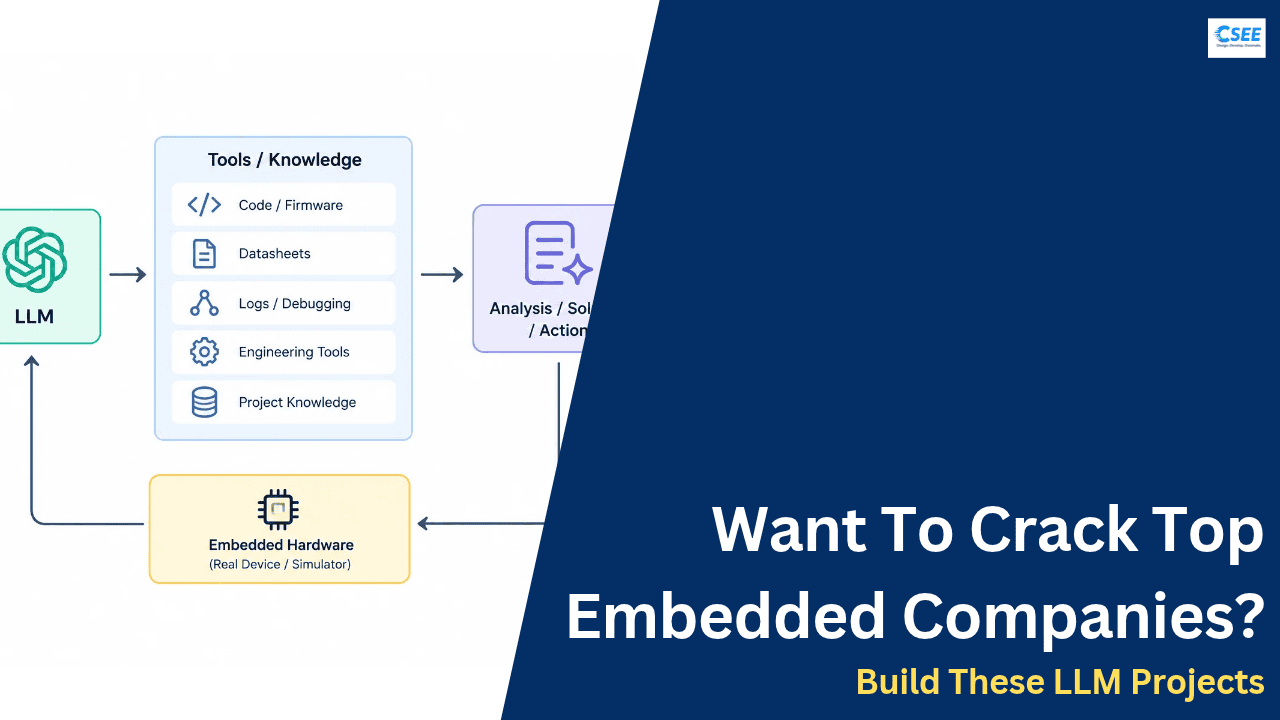
Nearly every project in this list follows the same pattern. Embedded data comes in (logs, traces, registers, code, specs). A pre-processing layer turns it into something compact. A model reasons over it with extra retrieved knowledge. A validator checks the answer against rules that are not negotiable, such as a compiler, a DBC file or a safety standard. Only then does the output reach the engineer.
What each block does
| Block | Purpose | Typical tools |
|---|---|---|
| Embedded data | Raw material the assistant works on | UART logs, .asc/.blf CAN traces, map files, ELF, register dumps |
| Pre-processor | Shrinks data to fit the model context and removes noise | Python, cantools, pyelftools, regex, tokenisers |
| Knowledge base | Grounds answers in your real documents | Vector store, datasheet chunks, reference manuals, AUTOSAR specs |
| LLM | Reasoning, summarising, code generation | Hosted API or a local quantised model |
| Validator | Rejects wrong or unsafe output automatically | GCC, cppcheck, DBC parser, unit tests, MISRA checker |
| Engineer | Final decision maker | Review UI, diff view, approval log |
3. The 100 projects by group
The list is split into ten groups. Pick one group, build two or three projects inside it, and connect them. Depth in one area beats a shallow spread.
A. Firmware debugging and log analysis (14)
Feed the model what the board is telling you, and have it propose causes.
01 LLM Firmware Debugger
Reads a HardFault or assert report plus map-file symbols, then ranks likely root causes with cited evidence and suggests the next measurement to confirm.
02 AI Embedded Log Analyzer
Condenses long serial or system logs into a timeline of events, clusters repeated errors, and highlights the first abnormal entry.
03 AI Crash-Dump Analyzer
Parses core dumps or fault registers with symbols to reconstruct the call chain and explain the likely cause of the crash.
04 AI UART Log Analyzer
Parses UART output, finds framing errors, boot messages and assertions, and presents them as a structured, searchable summary.
05 AI Interrupt Debugging Assistant
Reviews ISR code and priorities to find missed interrupts, long handlers, shared-data races and wrong NVIC settings.
06 AI DMA Debugging Assistant
Checks DMA channel, stream, burst and memory-alignment settings, and explains why transfers stall, corrupt or never complete.
07 AI Stack Overflow Detector
Combines stack-usage reports and runtime high-water marks to warn about overflow risk per task and suggest safer sizes.
08 AI Bootloader Debugging Assistant
Walks through boot logs, vector tables and flash layouts to find why a bootloader fails to start or jump to the application.
09 AI Firmware Update Assistant
Guides firmware update flows, checks image headers, versions and CRCs, and explains update failures from device logs.
10 AI OTA Debugging Assistant
Examines over-the-air update logs, server responses and rollback events to pinpoint where a remote update failed.
11 AI Kernel Log Analyzer
Summarises dmesg and kernel logs, spotting oopses, driver probe failures and timing problems and linking them to causes.
12 AI Build Error Analyzer
Reads long compiler and build output, isolates the first real error, and explains it with a concrete fix.
13 AI Linker Error Assistant
Interprets linker messages such as undefined references, region overflow and duplicate symbols, and edits scripts or sources to resolve them.
14 AI Compiler Warning Analyzer
Groups compiler warnings by risk, explains why each matters in embedded contexts and recommends which to fix first.
B. Code generation and peripheral configuration (12)
Turn plain language and datasheets into compilable, testable code.
15 Natural Language → Embedded C
Converts plain-English requirements into compilable Embedded C for a chosen MCU, then compiles and unit-tests the result before showing it.
16 LLM Device Driver Generator
Produces a first-draft peripheral or sensor driver from a description and register map, and iterates until it compiles and passes mock tests.
17 Natural Language → Simulink
Turns a described control strategy into a Simulink model skeleton via MATLAB scripting, with blocks, signals and basic test inputs.
18 AI Register Configuration Tool
Reads a reference manual and produces the exact register values and bit-field settings needed for a requested peripheral behaviour.
19 AI GPIO Configuration Assistant
Suggests pin assignments and GPIO modes from a described circuit, checking alternate-function conflicts and generating init code.
20 AI SPI Debugging Assistant
Examines SPI settings, waveforms or captures to find mode, clock, chip-select and timing mistakes, then explains the fix.
21 AI I²C Debugging Assistant
Diagnoses I²C faults such as NACKs, wrong addresses, pull-up problems and bus lock-ups from logic-analyser captures or driver logs.
22 AI PWM Configuration Assistant
Calculates timer prescaler, period and duty values for a target PWM frequency and resolution, and writes the setup code.
23 AI ADC Configuration Assistant
Chooses ADC resolution, sampling time, channels and trigger sources for a signal, and generates configuration with noise advice.
24 AI Timer Configuration Assistant
Computes timer settings for periodic events, input capture or one-shot delays, and checks that the chosen values meet accuracy needs.
25 AI FreeRTOS Code Generator
Generates FreeRTOS tasks, queues, semaphores and timers from a design description, with sensible priorities and stack sizes.
26 AI Datasheet-to-Driver Generator
Extracts the register map and init sequence from a datasheet and generates a tested driver from the structured data.
C. Code quality and testing (11)
Reviews, standards checks and test generation.
27 Embedded C Code Reviewer
Reviews Embedded C for bugs, race conditions, unsafe casts and style issues, producing line-level comments with severity and a suggested fix.
28 AI HIL Test Generator
Generates hardware-in-the-loop test scripts and stimulus sequences from requirements, with expected results and pass/fail limits.
29 LLM Requirements Analyzer
Reads requirement documents and flags ambiguity, conflicts, missing limits and untestable statements, suggesting clearer rewording.
30 AI Test-Case Generator
Creates test cases from requirements, including normal, boundary and fault cases, formatted for your test framework.
31 AI MISRA C Assistant
Checks code against MISRA C rules, explains each violation and proposes a compliant rewrite or a documented deviation.
32 AI Static Analysis Assistant
Triages static analysis results, filtering false positives and explaining true defects with their execution paths.
33 AI Code Refactoring Assistant
Suggests safe refactors that improve readability and modularity while preserving behaviour, verified by existing tests.
34 AI Legacy Firmware Modernizer
Analyses old firmware, documents what it does, and proposes a stepwise migration to modern structure and safer practices.
35 AI Unit-Test Generator
Generates unit tests with mocks and stubs for C functions, targeting branch and boundary coverage.
36 AI Integration-Test Generator
Creates integration tests that exercise modules together, such as driver plus RTOS task plus communication stack.
37 AI Hardware Test Assistant
Produces bench test procedures and scripts for instruments and boards, and interprets measurement results against limits.
D. Documentation and engineering copilots (8)
Assistants that know your project, your datasheets and your processes.
38 AI Datasheet Assistant
A question-answering tool over datasheets and reference manuals that retrieves the right page and cites it, so you stop hunting through PDFs.
39 Embedded Engineering Copilot
A general chat assistant grounded in your project code, specs and logs, answering engineering questions with references to the source.
40 AI Embedded Linux Copilot
A copilot for embedded Linux work, answering questions on boot flow, drivers, filesystems and tooling, using your board files.
41 AI ASPICE Documentation Assistant
Drafts ASPICE work products such as test specifications and traceability tables from your artefacts, for engineer approval.
42 AI Engineering Documentation Generator
Creates design notes, API pages and release notes from code and commits, keeping them in sync with the source.
43 AI Embedded Interview Assistant
Asks embedded interview questions, evaluates answers and gives feedback with targeted follow-up topics.
44 AI Embedded Learning Copilot
A tutor that builds personalised study paths, explains concepts with small code exercises and tracks progress.
45 Full-Stack AI Embedded Engineering Copilot
Combines debugging, code, test, protocol and documentation tools behind one assistant that chooses the right tool for each task.
E. RTOS, embedded Linux and performance (8)
Scheduling, memory, power and system-level tooling.
46 LLM RTOS Debugger
Analyses RTOS task states, priorities and trace logs to spot deadlocks, priority inversion, starvation and missed deadlines, then explains each in plain words.
47 AI Memory Optimization Assistant
Reads map files to find large symbols and wasted RAM or flash, then proposes changes such as const placement or smaller buffers.
48 AI Embedded Performance Optimizer
Profiles execution traces and cycle counts to find hot spots, then recommends algorithmic or compiler-level optimisations.
49 AI Power Consumption Analyzer
Analyses current measurements and sleep-state logs to find what keeps the device awake and estimates battery life changes.
50 AI Linux Driver Assistant
Helps write and debug Linux kernel drivers, explaining APIs, probe flow and common mistakes with suggested code.
51 AI Device Tree Generator
Produces device tree nodes from a board description, checking property names, addresses and interrupt wiring for consistency.
52 AI Yocto Build Assistant
Explains Yocto recipes, layers and build failures, and proposes fixes for dependency, license and fetch errors.
53 AI Board Bring-Up Assistant
Offers a step-by-step checklist for first power-up: rails, clocks, reset, debug link, memory and first peripheral checks.
F. Hardware, sensors and perception (11)
Schematics, sensors, calibration, fusion and ADAS tooling.
54 AI Schematic Analysis Assistant
Reviews schematic netlists for missing pull-ups, wrong decoupling, voltage mismatches and unconnected pins, with explanations.
55 AI PCB Debugging Assistant
Takes symptoms and measurements from a faulty board and suggests probable causes and the next probing points.
56 AI Sensor Integration Assistant
Helps choose, wire and configure a sensor, generating example code and checking voltage levels and bus compatibility.
57 AI Sensor Calibration Assistant
Guides calibration procedures, computes offsets and gain from recorded data, and verifies improvements numerically.
58 AI Sensor-Fusion Assistant
Explains and configures fusion methods such as Kalman filters, tuning noise values from recorded sensor data.
59 AI IMU Data Analyzer
Analyses accelerometer and gyroscope recordings for bias, drift, noise and vibration, and summarises findings.
60 AI Automotive Radar Assistant
Interprets radar parameters, range-Doppler outputs and detection lists, and helps tune configuration for use cases.
61 AI LiDAR Data Assistant
Summarises point-cloud statistics, finds dropouts and misalignment, and explains common LiDAR data issues.
62 AI ADAS Debugging Copilot
Correlates logs from perception, planning and control to explain why an ADAS function behaved unexpectedly.
63 AI Camera Pipeline Assistant
Reviews camera sensor, ISP and encoder settings, explaining image quality or latency issues and recommended changes.
64 AI DMS Development Assistant
Supports driver-monitoring development with dataset checks, model integration help and latency and accuracy reporting.
G. Automotive networks and diagnostics (10)
CAN, CAN-FD, FlexRay, Ethernet, SOME/IP and UDS.
65 AI CAN Bus Analyzer
Decodes CAN traces with a DBC, computes jitter, load and error statistics, and has the model explain which ECU misbehaved and when.
66 AI ECU Diagnostic Assistant
Takes DTCs, freeze-frame data and symptoms from an ECU and suggests probable causes and the order of checks a technician should follow.
67 AI UDS Diagnostic Assistant
Helps build and decode UDS requests and responses, explains service IDs and negative response codes, and proposes diagnostic sequences.
68 AI CAN DBC Analyzer
Inspects DBC files for overlapping signals, wrong scaling, missing receivers and naming issues, and summarises the network in readable form.
69 AI ECU Log Summarizer
Condenses ECU logs from many sources into an ordered timeline with key events, errors and state changes.
70 AI Automotive Network Assistant
Describes an in-vehicle network from its files, checking gateways, routing and bus load and explaining design trade-offs.
71 AI FlexRay Analyzer
Parses FlexRay schedules and traces, checks slot assignments and cycle timing, and explains synchronisation errors.
72 AI CAN-FD Analyzer
Analyses CAN-FD traces and bit-rate settings, finds data-phase errors and compares load against classic CAN.
73 AI Ethernet Diagnostics Assistant
Reads automotive Ethernet captures, checking link state, VLANs and timing, and explains diagnostic findings.
74 AI SOME/IP Assistant
Explains SOME/IP service discovery, method calls and events from captures and configs, and finds mismatched versions.
H. AUTOSAR and functional safety (7)
Architecture, configuration and safety analysis support.
75 LLM AUTOSAR Assistant
Explains AUTOSAR concepts, layers and configuration items, and helps draft ARXML snippets and module settings for a given use case.
76 AI AUTOSAR BSW Assistant
Helps configure AUTOSAR basic software modules such as COM, PduR and NvM, explaining parameters and dependencies.
77 AI AUTOSAR RTE Assistant
Explains RTE generation, ports and runnables, and helps resolve mapping and interface mismatches in software components.
78 AI ISO 26262 Assistant
Answers ISO 26262 questions, assists with hazard analysis wording and checks documents for missing safety-process items.
79 AI Functional-Safety Analyzer
Examines safety concepts for coverage of faults, diagnostics and safe states, and highlights gaps for review.
80 AI FMEA Assistant
Proposes failure modes, effects and causes for a component list and drafts a FMEA table for engineers to refine.
81 AI Fault-Tree Analysis Assistant
Builds fault-tree structures from a top event and component data, and calculates simple probability results.
I. EV, BMS and power electronics (7)
Battery, charging, motor control and thermal systems.
82 AI BMS Assistant
Answers questions about cell voltage, temperature, SOC and fault flags from BMS data, explaining protection events and suggesting limits to review.
83 AI Battery Fault Analyzer
Analyses battery logs to detect imbalance, abnormal temperature rise or resistance growth and suggests probable faults.
84 AI EV Charging Assistant
Explains charging protocols and session logs, and diagnoses handshake or current-limit failures between vehicle and charger.
85 AI Motor-Control Assistant
Helps tune FOC and PI parameters, explains current and speed loops, and diagnoses instability from recorded data.
86 AI Inverter Debugging Assistant
Interprets inverter fault codes, gate-drive signals and DC-link data to narrow down failing stages.
87 AI Thermal Monitoring Assistant
Monitors temperature sensors and models, flags unusual rise rates and recommends derating or cooling checks.
88 AI Predictive Maintenance System
Learns normal behaviour from sensor history, predicts degradation and explains the signals behind each warning.
J. Edge AI, simulation and voice (12)
Model optimisation, accelerator tuning, digital twins and voice control.
89 AI Edge-AI Model Optimizer
Chooses pruning, quantisation and operator changes for a model on a target device and reports the accuracy-latency trade-off.
90 LLM + TinyML Assistant
Helps pick, train and deploy a tiny model on a microcontroller, generating inference code with memory estimates.
91 LLM Quantization Assistant
Proposes quantisation methods, runs calibration, and compares size, accuracy and speed across precisions.
92 LLM Model Compression Tool
Applies pruning, distillation and low-rank methods to shrink a model, with a before-and-after report.
93 AI Neural-Network Deployment Assistant
Guides converting a trained network to a runtime format, checks unsupported layers and validates outputs on the device.
94 AI TensorRT Optimization Assistant
Suggests TensorRT settings such as precision, batch size and workspace, and explains profiling results.
95 AI CUDA Embedded Assistant
Helps write and tune CUDA kernels for embedded GPUs, explaining memory use, occupancy and launch settings.
96 AI NPU Performance Analyzer
Reads NPU profiling output to find layers falling back to the CPU and bandwidth bottlenecks, with remedies.
97 AI TOPS/Latency Analyzer
Compares claimed TOPS with measured latency, explaining memory, precision and utilisation gaps on a device.
98 Voice-Controlled Embedded System
Maps spoken commands to safe device actions with a fixed command set, confirmation steps and offline recognition.
99 LLM + Digital Twin Assistant
Links a simulated model of a device to live data and lets users ask what-if questions in plain language.
100 LLM-Based Hardware Simulator
Describes a virtual board or peripheral behaviour from specs so firmware can be tested before hardware exists.
4. Group overview: skills, hardware and difficulty
| Group | Skills you prove | Hardware to use | Difficulty |
|---|---|---|---|
| A. Debugging | Fault reasoning, log parsing, toolchain knowledge | STM32 or ESP32 board, USB-UART | Beginner to medium |
| B. Code generation | Peripherals, registers, prompt design, compile checks | Any Cortex-M dev board | Beginner to medium |
| C. Quality and testing | MISRA, unit tests, static analysis, CI | PC only, optional board | Medium |
| D. Copilots | Retrieval, document handling, UX | PC only | Medium |
| E. RTOS and Linux | Scheduling, memory, device tree, Yocto | Raspberry Pi, BeagleBone, STM32 | Medium to hard |
| F. Sensors and perception | Signal processing, calibration, fusion | IMU, camera, radar or LiDAR dataset | Medium to hard |
| G. Automotive networks | CAN, UDS, DBC, Ethernet | CAN adapter, two nodes, simulator | Medium |
| H. AUTOSAR and safety | Process, standards, configuration | PC, open AUTOSAR examples | Hard |
| I. EV and BMS | Battery models, power electronics | BMS evaluation board, simulator | Medium to hard |
| J. Edge AI | Quantisation, profiling, deployment | Jetson, NPU board, MCU with TinyML | Hard |
5. How a project actually works: three worked examples
Example 1: AI CAN Bus Analyzer (65)
The goal is to take a raw CAN trace and tell the engineer what is wrong in plain language. The key design choice is that the model never reads the raw trace. A parser first decodes frames with a DBC file, computes statistics, and passes only the interesting parts onward.
Useful checks to compute before calling the model: cycle-time jitter per message, missing or duplicate counters, signals outside DBC limits, bus load percentage, error-frame bursts and bus-off events. The model then writes the story: which ECU likely misbehaved, when it began, and what to measure next.
| Step | Output | Validation |
|---|---|---|
| Decode | Signal values per timestamp | Frame count matches the logger |
| Statistics | Per-ID cycle time, load, error counts | Spot-check against a scope or analyser |
| Prompt | Compact JSON of anomalies | Every claim must cite an ID and time |
| Report | Ranked hypotheses | Engineer confirms on the bench |
Example 2: Datasheet-to-Driver Generator (26)
Here the model reads a sensor datasheet and produces an initial driver. The trick is to extract structure first: register map, bit fields, timing limits and the init sequence. Then generate code from that structured data rather than from the raw PDF text.
The loop is what makes it a real project. Generated code is compiled, run against a mock bus, and any failure is returned to the model with the exact error. Track how many iterations it takes; that metric goes in your README.
Example 3: LLM Quantization Assistant (91)
Given a model and a target device, the assistant proposes a quantisation plan, runs it, and compares accuracy and latency. The model chooses between options; the measurements decide.
| Option | Size vs FP32 | Typical accuracy cost | Best for |
|---|---|---|---|
| FP16 | About 50% | Very small | GPUs, Jetson-class devices |
| INT8 post-training | About 25% | Small, needs calibration data | NPUs, TensorRT, MCUs with CMSIS-NN |
| INT8 quantisation-aware | About 25% | Smallest at INT8 | When post-training loses too much |
| INT4 / mixed | 12% to 20% | Model dependent | Tight memory, small language models |
6. Choosing the model: cloud or local
Automotive and industrial teams often cannot send source code or logs to an outside service. Learn both paths. A local quantised model on a workstation or a Jetson shows you can respect confidentiality. A hosted model gives stronger reasoning for hard problems.
| Factor | Hosted model | Local model |
|---|---|---|
| Reasoning quality | Strongest | Good for narrow tasks |
| Data privacy | Needs policy approval | Data stays on your machine |
| Cost | Pay per use | Hardware cost, then free |
| Latency | Network dependent | Predictable |
| Works offline on a bench | No | Yes |
7. Techniques that make these projects reliable
Structured context, not raw dumps
A 50 MB trace will not fit and would not help if it did. Reduce first: counts, outliers, time windows around the fault, symbol names resolved from the map file. Give the model a short, factual brief.
Retrieval from your own documents
Split datasheets, reference manuals and standards into small chunks with page numbers. Retrieve the few most relevant chunks for each question and require the model to cite them. If it cannot cite, it should say it does not know.
Tool use
Let the model call small, safe tools: decode a frame, look up a symbol, compute a CRC, run the compiler, read a register on a test board in read-only mode. The model decides which tool to call; your code executes it and returns facts.
Validators
| Output type | Automatic check |
|---|---|
| C code | Compile with warnings as errors, cppcheck, MISRA rules, unit tests |
| Register values | Compare with the reset value and allowed range in the extracted map |
| CAN explanation | Verify cited frame IDs and timestamps exist in the trace |
| Test cases | Run them, measure coverage, mutate code to see whether they fail |
| Safety documents | Check required sections and trace links to requirement IDs |
A minimal prompt pattern
ROLE: embedded firmware engineer, Cortex-M4, FreeRTOS 10.
FACTS (do not invent beyond these):
 - Fault: HardFault, PC=0x0800_3A1C, LR=0xFFFF_FFF9
 - Symbol at PC: sensor_task+0x4C (sensor.c:112)
 - Stack high-water mark: sensor_task = 14 words
TASK: list the 3 most likely causes, ranked.
RULES: cite the fact used for each cause.
 If evidence is insufficient, say what to measure next.
8. Build roadmap
Do not start with project 100. Grow in stages so each project reuses what the last one taught you.
| Stage | Suggested projects | Time | Portfolio outcome |
|---|---|---|---|
| 1 | 02, 04, 12, 13, 14, 03 | 2 to 3 weeks | Working analysers with real logs |
| 2 | 15, 16, 26, 27, 35, 31 | 4 to 6 weeks | Generate, compile, test loop in CI |
| 3 | 65, 68, 67, 46, 82, 05 | 6 to 8 weeks | Demo on a real board or bus |
| 4 | 39, 45, 89, 91, 78, 80 | 8+ weeks | A copilot that ties everything together |
9. Risks and how to handle them
| Risk | Example | Mitigation |
|---|---|---|
| Hallucinated register | Model invents a bit field that does not exist | Generate only from extracted maps and check against them |
| Unsafe code | Dynamic allocation or recursion in a safety path | MISRA and static analysis as a gate |
| Data leakage | Proprietary code sent to an outside API | Local model, redaction, clear policy |
| Over-trust | Engineer accepts a diagnosis without testing | Always show evidence and a verification step |
| Non-determinism | Different answers on each run | Low temperature, fixed prompts, regression test set |
10. Making the project impressive
Recruiters skim. Help them in the first thirty seconds.
- Show a demo: a short recording of a real board or real trace, not only a screenshot.
- Show numbers: faults found out of faults injected, compile success rate, tokens per query, latency on the target device.
- Show failures: a section on where the assistant was wrong and what you changed. It signals engineering maturity.
- Show the validator: explain what stops bad output from reaching hardware.
- Explain the design choice: why this model, why this chunk size, why local or hosted.
README checklist
| Section | Content |
|---|---|
| Problem | One paragraph, written for an embedded engineer |
| Architecture | One diagram like those above |
| Hardware | Board, adapters, wiring photo |
| Results | Table of measured metrics |
| Limits | Known failure modes, what is not safe to automate |
| How to run | Three commands or fewer |
11. Interview angles these projects unlock
Firmware roles
Talk about HardFault analysis, ISR timing, DMA pitfalls and how your tool reasons about them.
Automotive roles
Talk about DBC handling, UDS services, cycle-time jitter, AUTOSAR layers and ISO 26262 traceability.
Edge AI roles
Talk about quantisation trade-offs, TOPS versus real latency and memory bandwidth limits.